本日はUntiy枠です。
前回まででUnityで3Dモデルのピボットを調整する機能を実装しました。
ここまでではランタイムでのみ実行されることが想定されていました。
用途としては開発者向けのDevepolerToolsとしての側面が大きいため今回はEditor上で実行できるように改修していきます。
〇環境
・Windows11PC
・Unity2022.3.21f1
〇Editor拡張でオブジェクトのピボット変更機能を実装する

これによってEditor上でのみ実行され、ランタイムの実機環境では実行されないようになります。
②Editor用のスクリプトを作成します。

③Editor用のスクリプトの内容を記述します。
using UnityEditor;
using UnityEngine;

//EditorWindowを継承 これによってUnityのEditorWindowが使用可能
public class AdjustPivotPointEditor : EditorWindow
{
    private GameObject selectedObject;
    private Transform pivotTransform;
    private bool adjustPosition = true;
    private bool adjustRotation = true;
    private bool adjustScale = true;
    //エクスポートパス
    private string exportPath = "Assets/ExportedMesh.obj";

    //GameObjectメニューにAdjust Pivot Pointというコマンドを定義
    [MenuItem("GameObject/Adjust Pivot Point", false, 10)]
    public static void ShowWindow()
    {
   //ウィンドウを開く
        var window = GetWindow<AdjustPivotPointEditor>("Adjust Pivot Point");
        window.Show();
    }
   //WindowのGUI
    private void OnGUI()
    {
        GUILayout.Label("Adjust Pivot Point Settings", EditorStyles.boldLabel);

        // オブジェクトの設定
        selectedObject = (GameObject)EditorGUILayout.ObjectField("Target Object", selectedObject, typeof(GameObject), true);
        pivotTransform = (Transform)EditorGUILayout.ObjectField("Pivot Transform", pivotTransform, typeof(Transform), true);

        EditorGUILayout.Space();

        // オプションの設定
        adjustPosition = EditorGUILayout.Toggle("Adjust Position", adjustPosition);
        adjustRotation = EditorGUILayout.Toggle("Adjust Rotation", adjustRotation);
        adjustScale = EditorGUILayout.Toggle("Adjust Scale", adjustScale);

        EditorGUILayout.Space();

        // エクスポートパスの設定
        exportPath = EditorGUILayout.TextField("Export Path", exportPath);

        if (GUILayout.Button("Adjust Pivot"))
        {
            if (selectedObject != null && pivotTransform != null)
            {

                AdjustPivot();
            }
            else
            {
                EditorUtility.DisplayDialog("Error", "Target Object and Pivot Transform must be set.", "OK");
            }
        }
    }

    private void AdjustPivot()
    {
        AdjustPivotPoint adjustPivotPoint = selectedObject.GetComponent<AdjustPivotPoint>();
        if (adjustPivotPoint == null)
        {
            adjustPivotPoint = selectedObject.AddComponent<AdjustPivotPoint>();
        }

        // パラメータの設定
        adjustPivotPoint.pivot = pivotTransform;
        adjustPivotPoint.adjustPosition = adjustPosition;
        adjustPivotPoint.adjustRotation = adjustRotation;
        adjustPivotPoint.adjustScale = adjustScale;
        adjustPivotPoint._path = exportPath;

        // ピボットを調整
        adjustPivotPoint.SendMessage("AdjustMeshPivot");

        // コンポーネントを削除(ランタイムに残らないようにするため)
        DestroyImmediate(adjustPivotPoint);

        EditorUtility.DisplayDialog("Success", "Pivot adjustment complete. Mesh exported.", "OK");
    }
}
ここではコメント通りエディタウィンドウを定義し、GUIを定義しました。
これによって上部ワールドメニューGameObjectメニュー内にAdjust Pivot Pointコマンドが定義されます。

これを実行すると以下のようなウィンドウが開きます。
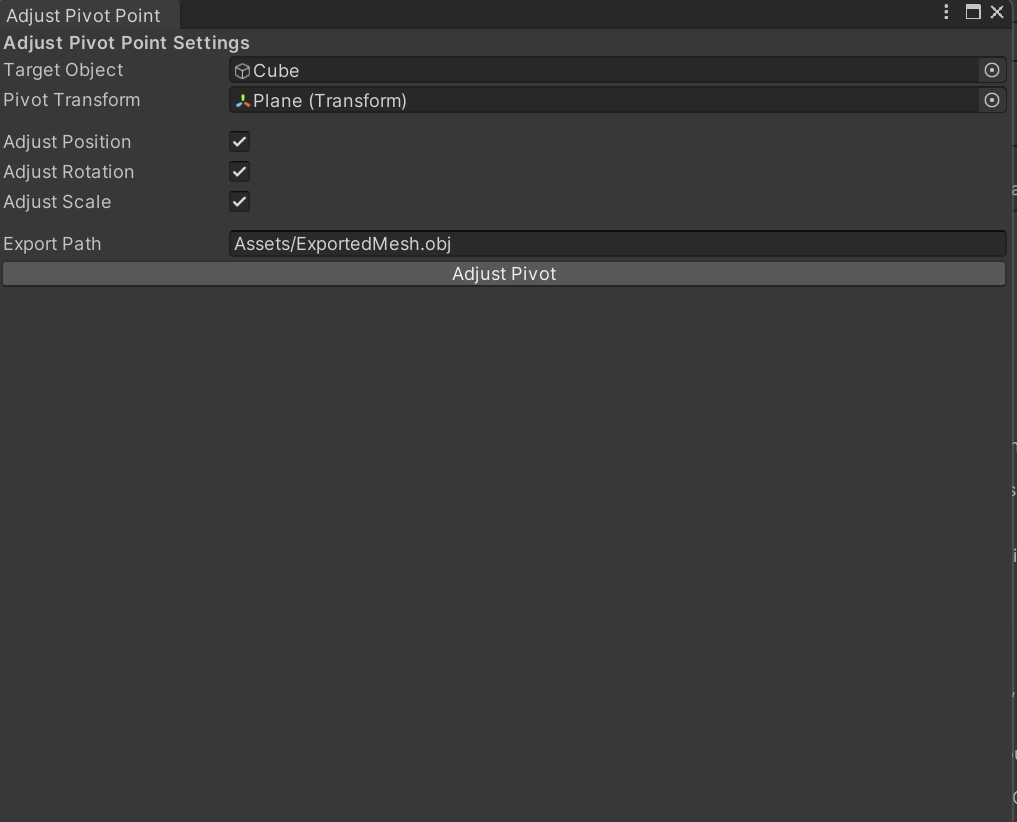
以上でUnityEditor拡張でオブジェクトのピボットを変更することができるようになりました。
現状で開発完了ですが、静的なメッシュであれば事足りますが、リグが入っているモデルやアニメーションが入っているモデルなどまだまだ検証が必要です。
〇コード全文
#if UNITY_EDITOR
using System.IO;
using JetBrains.Annotations;
using UnityEngine;

[RequireComponent(typeof(MeshFilter))]
public class AdjustPivotPoint : MonoBehaviour
{
    [SerializeField] [NotNull] public Transform pivot; // ピボットを設定するTransform
    [SerializeField] public bool adjustPosition = true; // 位置を調整するか
    [SerializeField] public bool adjustRotation = true; // 回転を調整するか
    [SerializeField] public bool adjustScale = true; // スケールを調整するか
    [SerializeField] public string _path; // エクスポート先のパス

    public void AdjustMeshPivot()
    {
        MeshFilter meshFilter = GetComponent<MeshFilter>();
        Mesh originalMesh = meshFilter.sharedMesh;

        if (originalMesh == null)
        {
            Debug.LogWarning("No mesh found on this object.");
            return;
        }

        Mesh newMesh = Instantiate(originalMesh);
        Vector3 pivotWorldPosition = pivot.position;

        Vector3[] vertices = newMesh.vertices;
        for (int i = 0; i < vertices.Length; i++)
        {
            Vector3 vertexWorldPosition = transform.TransformPoint(vertices[i]);
            vertexWorldPosition -= pivotWorldPosition;
            vertices[i] = vertexWorldPosition;
        }

        newMesh.vertices = vertices;
        newMesh.RecalculateBounds();
        newMesh.RecalculateNormals();

        meshFilter.mesh = newMesh;

        if (adjustPosition)
        {
            transform.position = pivotWorldPosition;
        }
        if (adjustRotation)
        {
            transform.rotation = Quaternion.identity;
        }
        if (adjustScale)
        {
            transform.localScale = Vector3.one;
        }

        ExportMeshToObj(newMesh);
    }

    private void ExportMeshToObj(Mesh mesh)
    {
        if (string.IsNullOrEmpty(_path))
        {
            Debug.LogWarning("Export path is not set.");
            return;
        }

        using (StreamWriter writer = new StreamWriter(_path))
        {
            writer.WriteLine("# Exported by AdjustPivotPoint");
            writer.WriteLine("o " + gameObject.name);

            foreach (Vector3 vertex in mesh.vertices)
            {
                writer.WriteLine($"v {vertex.x} {vertex.y} {vertex.z}");
            }

            foreach (Vector3 normal in mesh.normals)
            {
                writer.WriteLine($"vn {normal.x} {normal.y} {normal.z}");
            }

            if (mesh.uv.Length > 0)
            {
                foreach (Vector2 uv in mesh.uv)
                {
                    writer.WriteLine($"vt {uv.x} {uv.y}");
                }
            }

            for (int i = 0; i < mesh.triangles.Length; i += 3)
            {
                int vertexIndex1 = mesh.triangles[i] + 1;
                int vertexIndex2 = mesh.triangles[i + 1] + 1;
                int vertexIndex3 = mesh.triangles[i + 2] + 1;
                writer.WriteLine($"f {vertexIndex1} {vertexIndex2} {vertexIndex3}");
            }
        }

        Debug.Log("Mesh exported to: " + _path);
    }
}
#endif
using UnityEditor;
using UnityEngine;

public class AdjustPivotPointEditor : EditorWindow
{
    private GameObject selectedObject;
    private Transform pivotTransform;
    private bool adjustPosition = true;
    private bool adjustRotation = true;
    private bool adjustScale = true;
    private string exportPath = "Assets/ExportedMesh.obj";

    [MenuItem("GameObject/Adjust Pivot Point", false, 10)]
    public static void ShowWindow()
    {
        var window = GetWindow<AdjustPivotPointEditor>("Adjust Pivot Point");
        window.Show();
    }

    private void OnGUI()
    {
        GUILayout.Label("Adjust Pivot Point Settings", EditorStyles.boldLabel);

        // オブジェクトの設定
        selectedObject = (GameObject)EditorGUILayout.ObjectField("Target Object", selectedObject, typeof(GameObject), true);
        pivotTransform = (Transform)EditorGUILayout.ObjectField("Pivot Transform", pivotTransform, typeof(Transform), true);

        EditorGUILayout.Space();

        // オプションの設定
        adjustPosition = EditorGUILayout.Toggle("Adjust Position", adjustPosition);
        adjustRotation = EditorGUILayout.Toggle("Adjust Rotation", adjustRotation);
        adjustScale = EditorGUILayout.Toggle("Adjust Scale", adjustScale);

        EditorGUILayout.Space();

        // エクスポートパスの設定
        exportPath = EditorGUILayout.TextField("Export Path", exportPath);

        if (GUILayout.Button("Adjust Pivot"))
        {
            if (selectedObject != null && pivotTransform != null)
            {
                AdjustPivot();
            }
            else
            {
                EditorUtility.DisplayDialog("Error", "Target Object and Pivot Transform must be set.", "OK");
            }
        }
    }

    private void AdjustPivot()
    {
        AdjustPivotPoint adjustPivotPoint = selectedObject.GetComponent<AdjustPivotPoint>();
        if (adjustPivotPoint == null)
        {
            adjustPivotPoint = selectedObject.AddComponent<AdjustPivotPoint>();
        }

        // パラメータの設定
        adjustPivotPoint.pivot = pivotTransform;
        adjustPivotPoint.adjustPosition = adjustPosition;
        adjustPivotPoint.adjustRotation = adjustRotation;
        adjustPivotPoint.adjustScale = adjustScale;
        adjustPivotPoint._path = exportPath;

        // ピボットを調整
        adjustPivotPoint.SendMessage("AdjustMeshPivot");

        // コンポーネントを削除(ランタイムに残らないようにするため)
        DestroyImmediate(adjustPivotPoint);

        EditorUtility.DisplayDialog("Success", "Pivot adjustment complete. Mesh exported.", "OK");
    }
}
